WiFi instructions: Make internet access easy for guests
WiFi access is essential for most guests. Provide clear, easy-to-find WiFi instructions to prevent the most common guest question: "What's the WiFi password?"
Principais pontos
- •Place WiFi information at the top of your guest guide—guests need it immediately.
- •Include network name (SSID) and password clearly.
- •Provide troubleshooting tips and backup internet options if available.
Use o seu wifi instructions com a automação Booking.com
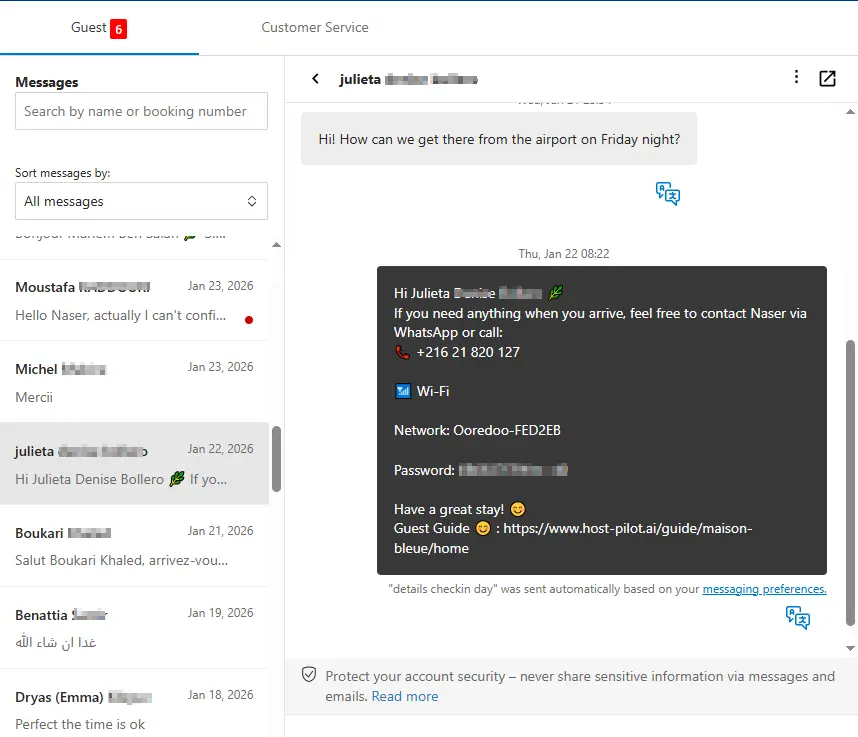
Quer esteja a criar um wifi instructions ou a refinar um existente, pode conectá-lo ao Booking.com e usar o mesmo link do guia em mensagens automáticas. Os hóspedes recebem respostas consistentes e você menos perguntas repetidas, independentemente do canal de reserva.
Problemas comuns dos anfitriões
- •Guests repeatedly ask for WiFi password
- •WiFi instructions are buried in messages or listing
- •Guests can't connect and don't know how to troubleshoot
- •No backup internet option when WiFi is down
O que boas soluções devem incluir
- •WiFi information prominently displayed in guest guide
- •Include both network name and password clearly
- •Basic troubleshooting steps for common connection issues
- •Backup internet option (mobile hotspot info or nearby WiFi) if possible
Dicas práticas de anfitriões experientes
- Put WiFi info in multiple places: guest guide, check-in message, and a sign in the property.
- Test your WiFi password yourself—ensure it's easy to type on mobile.
- Include instructions for both 2.4GHz and 5GHz networks if applicable.
- Have a backup plan: know where guests can access WiFi if yours is down.
Ação: Escolha uma prática deste guia para implementar esta semana.
Opções comparadas
Escolha a abordagem que se adequa às suas necessidades.| Opção | Melhor para | Por que funciona ou não |
|---|---|---|
| Password in listing only | Hidden | Guests don't check listing details at check-in, still ask for password. |
| Password in message | Partial | Gets buried in inbox, hard to find when needed. |
| Password in guide + property sign | Accessible | Available in multiple places, guests can find it easily. |
Where Host Pilot fits
- •Include WiFi instructions prominently in your guest guide.
- •Make WiFi information easy to find at the top of essential sections.
- •Update WiFi details instantly if you change networks or passwords.
FAQ
Where should I put the WiFi password?+
In multiple places: at the top of your guest guide, in your check-in message, and on a sign in the property (near the router if possible).
Should I include troubleshooting steps?+
Yes, include basic steps like restarting the router or forgetting and reconnecting to the network. This reduces support requests.
What if my WiFi is unreliable?+
Be transparent with guests. Provide a backup option if possible (mobile hotspot info or nearby WiFi locations) and apologize in advance.
Guias relacionados
Pronto para criar seu guia de hóspedes?
Use este guia para criar um guia eficaz. O Host Pilot ajuda a criar guias para mobile com QR codes e recomendações locais.