Guest guide checklist: Everything to include for vacation rentals
Don't guess what to include in your guest guide. Use this checklist to ensure you cover everything guests need for a smooth stay and fewer questions.
Key takeaways
- •Start with essentials: check-in, WiFi, and emergency contacts.
- •Add house rules, local recommendations, and checkout instructions.
- •Review and update your guide quarterly to keep information current.
Use your guest guide checklist with Booking.com automation
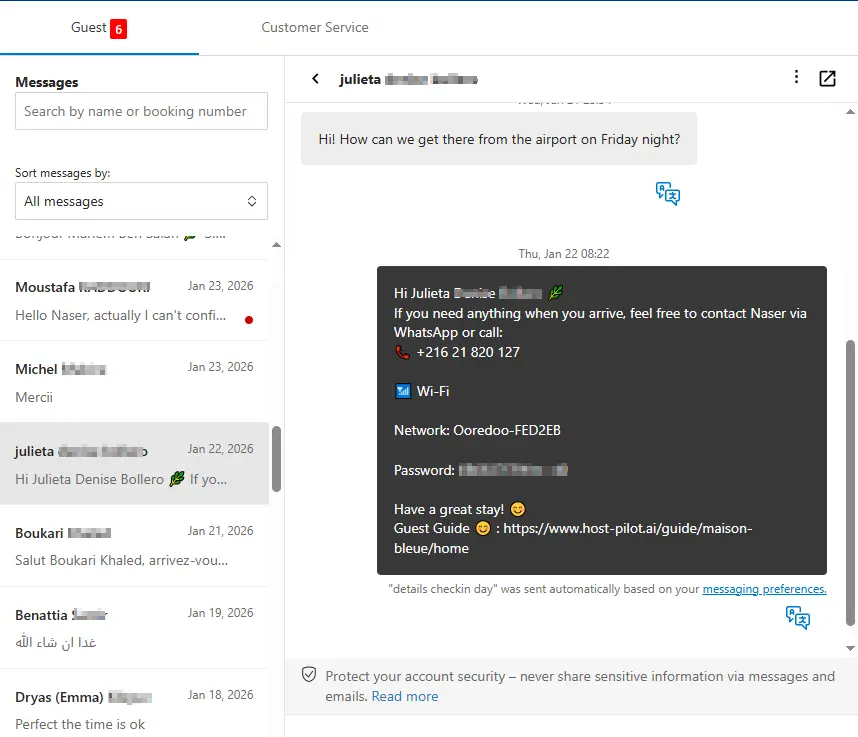
Whether you are building a guest guide checklist or refining an existing one, you can connect it to Booking.com and use the same guide link in automated messages. Guests get consistent answers and you get fewer repeat questions, no matter which channel they booked on.
Common problems hosts face
- •Uncertain what to include in a guest guide and what to skip
- •Forgetting important details that guests end up asking about
- •Guide feels overwhelming or too sparse
- •Not updating the guide when house rules or local spots change
What good solutions should include
- •Structured checklist covering all essential categories
- •Template format that ensures nothing is missed
- •Regular review schedule to keep information current
- •Mobile-friendly format that guests can actually use
Practical tips from experienced hosts
- Create sections: Essential Info, House Rules, Local Area, Checkout, Emergency.
- Include photos for check-in locations, parking spots, and key features.
- Keep each section concise—guests want answers fast, not essays.
- Test your guide on a mobile device to ensure it's easy to navigate.
Action step: Pick one practice from this guide to implement this week. Test it with your next booking and measure the impact on guest questions and reviews.
Options compared
Choose the approach that fits your needs.| Option | Best for | Why it works / doesn't |
|---|---|---|
| No checklist | Ad hoc | Easy to miss important details, inconsistent across bookings. |
| Generic template | Basic | May not fit your property or local area specifics. |
| Comprehensive checklist | Complete | Ensures all essential information is included and organized. |
Where Host Pilot fits
- •Use our checklist template to build your guest guide step-by-step.
- •Organize information into clear sections that guests can navigate easily.
- •Update your guide anytime and share the updated link instantly.
FAQ
What are the absolute must-haves for a guest guide?+
Check-in instructions, WiFi password, house rules, emergency contacts, and checkout time. Everything else is helpful but these are essential.
How long should my guest guide be?+
Keep it concise but complete. Aim for 5–10 scrolls on mobile. If it's longer, break it into sections with clear headings.
Should I include photos in my guest guide?+
Yes, especially for check-in locations, parking, and unique property features. Photos reduce confusion and questions.
Related guides
Ready to create your guest guide?
Use this guide to build an effective guest guide for your property. When you're ready, Host Pilot can help you create mobile-friendly guides with QR codes, local recommendations, and easy updates.