Import once

Turn your Airbnb or Booking.com listing into a direct booking website and guest guide.

Free number included

WhatsApp Inbox for Guest Messaging

Unified WhatsApp inbox to manage all guest conversations in one place. Get a free WhatsApp number, connect via Meta OAuth, and start messaging guests through the world's most popular messaging platform.

Free Number

Get a free WhatsApp Business number with no setup fees

Unified Inbox

Manage all WhatsApp conversations alongside email in one inbox

Light-mode unified WhatsApp inbox showing guest conversations and reservation context for vacation rentals
Unified WhatsApp inbox for guest messaging management
Free Included

Free WhatsApp Number Generation

Get a free WhatsApp Business number included with your plan. No setup fees, no monthly charges for the number itself. Just connect via Meta OAuth and start messaging guests immediately.

  • Free Number Included: Get a WhatsApp Business number at no extra cost
  • Meta OAuth Integration: Simple one-click connection to your Meta Business account
  • Instant Setup: Your WhatsApp number is ready to use within minutes
  • Professional Presence: Give guests a dedicated WhatsApp line for easy communication
Light-mode WhatsApp inbox dashboard connected to Meta Business account for guest communication

Unified Inbox for All Guest Communications

Manage WhatsApp messages alongside email and other channels in one centralized inbox. Never miss a guest message, no matter which platform they use.

One inbox for WhatsApp and platform messages—no more app switching

All WhatsApp and guest messages in one place so you never miss a thread or lose context when a guest messages.

Email and WhatsApp in one place so you do not chase conversations

Gmail and Outlook alongside WhatsApp so every guest channel is in one inbox—no toggling between email and chat.

See which messages need a reply first so urgent ones do not get buried

AI prioritizes by intent and urgency and suggests responses so you answer the right thing fast.

Never miss an urgent guest message

Instant notifications when guests message on WhatsApp so you can reply before they get frustrated or book elsewhere.

Reply with the right details without asking "which booking?"

Reservation, property, and conversation history in one view so you give accurate answers without digging.

Reply in one click instead of retyping the same answers

Templates and AI-suggested replies so you answer fast and stay professional without typing every message from scratch.

Easy Setup

Simple Meta OAuth Integration

Connect your Meta Business account with just one click. Our secure OAuth integration gives you access to WhatsApp Business API without complex configuration.

  • One-Click Connection: Connect your Meta Business account in seconds
  • Secure Authentication: Industry-standard OAuth 2.0 security for your data
  • Automatic Sync: Messages sync automatically to your unified inbox
  • No Technical Knowledge Required: Set up in minutes, no coding needed

Why Use WhatsApp for Guest Messaging?

WhatsApp is the world's most popular messaging platform. Meet your guests where they already are.

Higher Engagement

Guests prefer messaging over email. WhatsApp messages have a 98% open rate compared to 20% for email. Get faster responses and better guest satisfaction.

  • 98% message open rate
  • Faster response times
  • More guest engagement

Better Guest Experience

WhatsApp feels more personal and immediate. Guests can ask questions, share photos, and get instant support throughout their stay.

  • Familiar, easy-to-use platform
  • Send photos and documents
  • Real-time communication

Global Reach

With 2+ billion users worldwide, WhatsApp is the preferred messaging app in most countries. Reach international guests where they're most comfortable.

  • 2+ billion users worldwide
  • Most popular in key travel markets
  • Multilingual support

Professional Presence

Show guests you're modern and accessible. A dedicated WhatsApp Business number builds trust and makes you easier to reach.

  • Dedicated business number
  • Business profile with information
  • Verified business account

Set Up WhatsApp in 3 Simple Steps

Get your WhatsApp inbox up and running in minutes.

1

Connect Meta Account

Sign in with your Meta Business account using our secure OAuth integration. One click and you're connected.

2

Get Your Free Number

Receive your free WhatsApp Business number instantly. No setup fees, no waiting—it's ready immediately.

3

Start Messaging

Begin receiving and sending WhatsApp messages through your unified inbox. All conversations sync automatically.

Make chat useful without making it your whole knowledge base

The practical guide

A WhatsApp inbox integration for vacation rentals works best when it keeps guest conversations in context, sends helpful information at the right time, and leaves durable stay details in a guest guide instead of burying them in chat.

WhatsApp inbox integration with vacation rental guest conversation context
A unified inbox is useful when the reply includes the right property context.
Guest guide with virtual concierge linked from a WhatsApp guest message
Use chat for timely direction and the guide for durable stay information.

What hosts need from a WhatsApp inbox integration

A WhatsApp inbox integration is not simply another place to receive notifications. For a host, it should make the conversation easier to understand. When a guest sends “Where do we park?” the person replying needs to know which property and stage of stay the message belongs to. They also need a simple way to share the correct, current answer. A tidy inbox is valuable because it reduces context switching, not because it sends more messages.

Start by mapping the conversations that matter: booking questions, pre-arrival confirmation, access on arrival day, a question during the stay, and post-stay follow-up. Identify what needs a fast human reply and what can safely point to a detailed resource. That distinction turns a WhatsApp inbox integration into an operating habit. It helps you respond with care instead of copying the same long answer across multiple threads.

Use WhatsApp messages and the guest guide for different jobs

Use WhatsApp for a concise, timely message: a warm welcome, a reminder that the guide is available, a request for a missing detail, or an acknowledgement that you are looking into an issue. Use the guest guide for durable information: check-in steps, Wi-Fi, appliance instructions, house rules, emergency contact details, and local recommendations. This division makes the guest experience calmer because important information is not lost above a long chat history.

A Host Pilot guide is designed to open in a browser by link or QR code, so a WhatsApp message can point a guest to the right section without asking them to install another app. GuestGPT can help a guest search within the guide for routine stay questions. The host remains responsible for checking that the guide is correct and for stepping in when a guest has an urgent, sensitive, or unusual request.

A practical WhatsApp inbox integration workflow

Create a short pre-arrival message that confirms the essential timing and links to the guide. On arrival day, keep the message focused on the next action and make it clear how to get help if access fails. During the stay, reply to human questions with the relevant context rather than a generic template. After checkout, use a respectful thank-you and keep any direct booking follow-up separate from the operational conversation and within the rules that apply to your booking channel.

A small host can test this workflow with one property first. Send the guide link to an upcoming guest, then notice which questions arrive anyway. If guests still ask about the parking entrance, improve that guide section and use a clearer message label. If they need a person, make that handoff obvious. A WhatsApp inbox integration becomes valuable when it helps you learn from conversations and improve the information guests see before they ask.

Consent, privacy, and human escalation matter

Before contacting guests through WhatsApp, use the channel in a way that respects consent, local privacy requirements, and the terms of the booking platform. Do not assume that every guest wants marketing messages because they shared a phone number for a stay. Keep operational messages relevant, secure any account access, and avoid sharing sensitive access information more broadly than necessary.

Also set a human escalation rule. Automation and templates are useful for consistent information, but they should not decide how to handle a lockout, safety concern, refund dispute, or emergency. A clear owner or team response path builds more trust than an overly clever automated reply. The best WhatsApp inbox integration supports the host; it does not hide the host when a person is needed.

WhatsApp inbox integration checklist for hosts

  1. 1.Connect the conversation to the right property and stay context.
  2. 2.Use a concise message to share the guide instead of pasting a long manual.
  3. 3.Keep access, privacy, and consent practices clear.
  4. 4.Create a human escalation path for urgent or sensitive situations.
  5. 5.Review repeat questions and improve the guide section that should answer them.

Common mistakes to avoid

  • Treating WhatsApp as the only place to store important stay information.
  • Sending unnecessary marketing messages to operational contacts.
  • Using the same response for a routine question and an urgent issue.
  • Leaving a shared inbox without clear ownership or follow-up responsibility.

Questions hosts ask

What is a WhatsApp inbox integration for vacation rentals?

A WhatsApp inbox integration helps vacation rental hosts manage guest conversations in one place with enough property and reservation context to give useful replies.

Should I put check-in instructions in WhatsApp or a guest guide?

Use WhatsApp to send a concise, timely note and link to the guide. Put the full, durable instructions in a guest guide so guests can find them again during the stay.

Can WhatsApp automation replace a host?

No. Automation can help with repeatable information, but a host or team member should handle urgent, sensitive, safety, and exception requests.

Get Your Free WhatsApp Number

Tell us about your properties and we'll help you set up your WhatsApp inbox. We reply fast with a simple plan and next steps—no pressure, no jargon.

Free WhatsApp Business number included
Unified inbox for all guest messaging
Meta OAuth integration—set up in minutes
Request WhatsApp Setup

$99 one-time setup — sign up on the pricing page.

Prefer to explore on your own? Start with a free trial and set up WhatsApp yourself.

Short answer

guest communication software for Airbnb and Booking.com hosts

Host Pilot is built for hosts who need guest communication software, AI concierge support, WhatsApp workflows, and a guest guide that answers common stay questions without turning a small rental business into a heavy software project. Import one listing, then generate a direct booking website, a digital guest guide, and connected guest communication from the same source.

Why this product page matters for hosts

Search intent is usually practical: hosts want fewer repeated questions, clearer guest journeys, more direct booking control, and a setup that works before they hire an operations team.

Guest communication pages should show how messages, guest guide links, and AI answers reduce repeated questions across the stay.

Generated assets from one listing

  • Direct booking website: A simple direct booking website that reuses listing content, supports repeat guests, and gives hosts a channel beyond Airbnb and Booking.com.
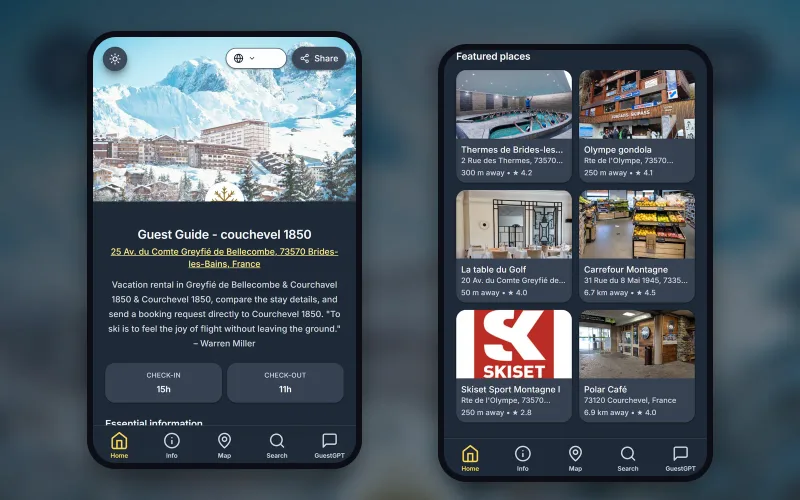
  • Digital guest guide: A mobile guest guide guests can open by link or QR code, with check-in details, Wi-Fi, house rules, local tips, and GuestGPT answers.
  • Connected guest communication: Message templates, AI concierge support, WhatsApp workflows, and guest guide links stay connected instead of scattered across tools.

Best fit

Use this when the pain is repeated guest questions, late replies, arrival confusion, or scattered inbox workflows.

Host Pilot is a better fit when you want a mobile-first guest experience layer, fast setup, direct booking pages, guest guides, and messaging in one simple workflow.

A heavier PMS can still be better if you manage a large portfolio, need complex accounting, or require enterprise owner reporting.

Product FAQ

How does Host Pilot improve guest communication?

It connects guest guide content, message templates, WhatsApp workflows, and AI concierge answers around the same listing information.

Can guests get answers without downloading an app?

Yes. Guests can open the guide by link or QR code and use GuestGPT where available.

Related Host Pilot pages

Start free trial