Airbnb host dashboard essentials
A clean dashboard should flag today’s check-ins, unresolved guest questions, and rates you must adjust before the weekend.
Key takeaways
- •Daily: arrivals/departures, unresolved issues, near-term rates.
- •Weekly: occupancy, ADR vs. last period, response time.
- •Share a one-page owner snapshot instead of ad-hoc updates.
What this guide helps you decide
The right choice is the smallest workflow that solves the repeating problem without making the rest of your operation harder to run.
Use the sections below to separate an urgent operational need from a feature you simply do not need yet. That keeps your setup useful as the portfolio grows.


Example: a realistic host workflow
This is a realistic example, not a customer story. A host with two apartments notices the same task slipping each week. They choose one clear owner, one shared source of truth, and one review point before adding another tool. The result is a calmer week because the team can see what happens next.
What a modern Airbnb host dashboard should show
See how Host Pilot transforms your daily operations and occupancy.
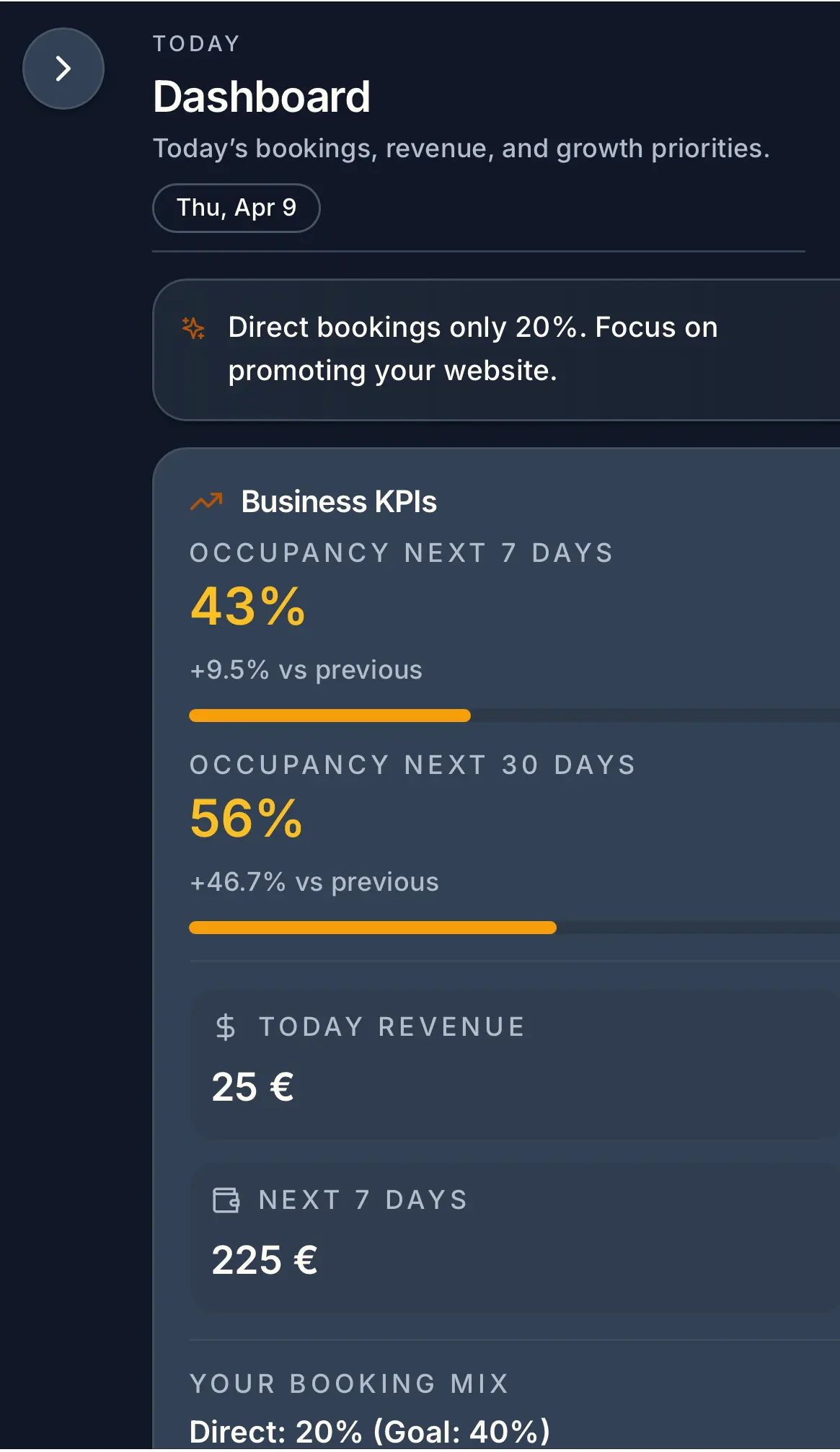
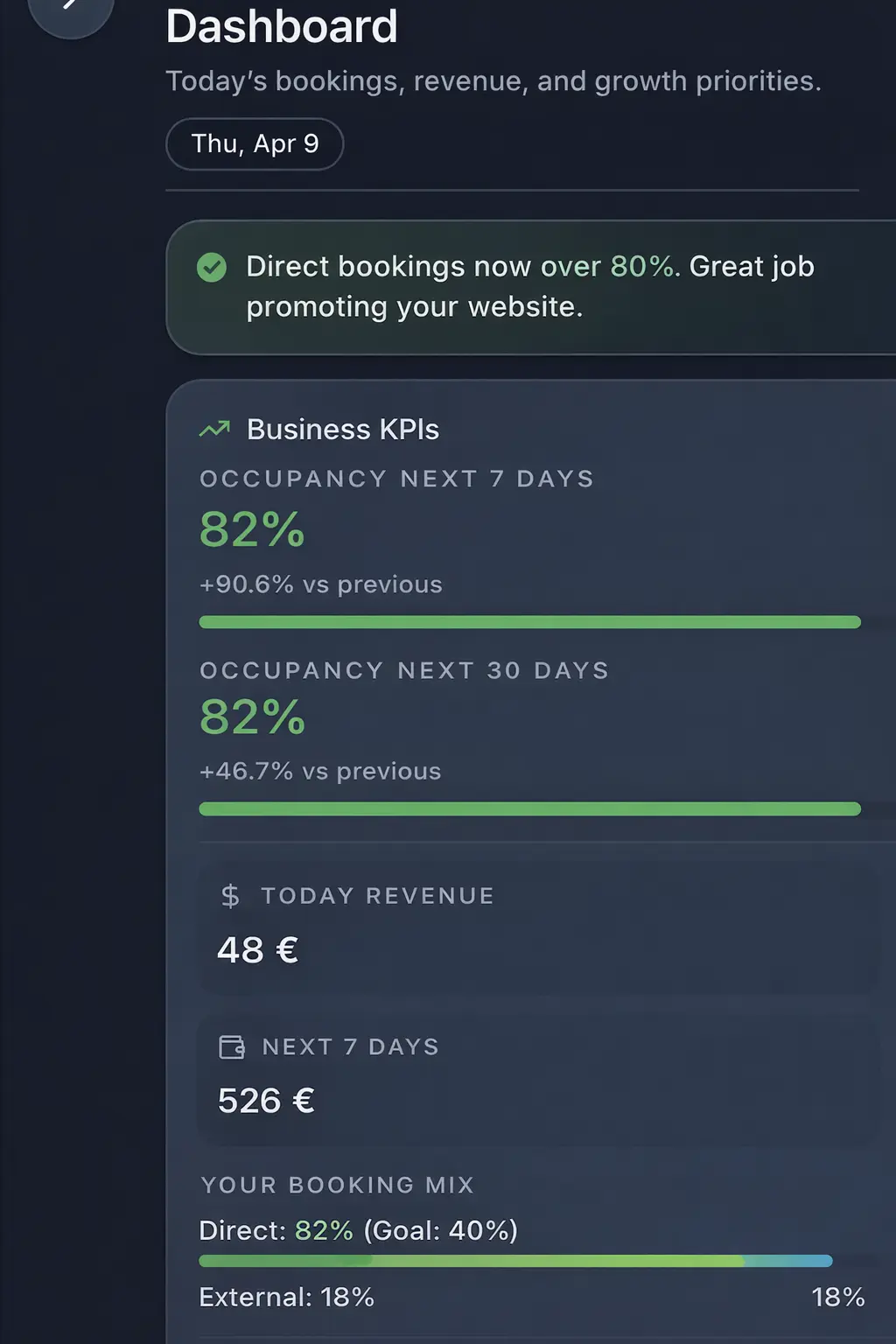
- Manual updates -> automated visibility
- Fragmented tools -> centralized dashboard
- More direct bookings with less admin
Common problems hosts face
- •Key metrics spread across Airbnb, spreadsheets, and pricing tools
- •No view of open guest issues by priority
- •Unclear if rate changes are improving occupancy or hurting margin
- •Owners ask for updates you cannot provide quickly
What good solutions should include
- •Daily view of arrivals, departures, and unresolved guest threads
- •Occupancy and ADR vs. last 30 days and last year
- •Upcoming events calendar with suggested pricing actions
- •Sharable summaries for cleaners and owners without exposing logins
Practical tips from day-to-day hosting
- Set a five-minute morning routine: check arrivals, unresolved issues, and weekend rates.
- Track three KPIs weekly: occupancy, ADR, and response time. Keep it simple.
- Log the outcome of pricing changes to learn what moved occupancy.
- Send owners a weekly snapshot instead of ad-hoc updates.
Mid-guide action: pick one change to test this week (e.g., add an approval-based arrival template or set a weekend rate floor) and measure response time or occupancy impact.
What good solutions should include
- •Daily view of arrivals, departures, and unresolved guest threads
- •Occupancy and ADR vs. last 30 days and last year
- •Upcoming events calendar with suggested pricing actions
- •Sharable summaries for cleaners and owners without exposing logins
A practical seven-day rollout
Do not change every process at once. Start with the highest-friction step, test it for one full booking cycle, then document the result.
- Daily: arrivals/departures, unresolved issues, near-term rates.
- Weekly: occupancy, ADR vs. last period, response time.
- Share a one-page owner snapshot instead of ad-hoc updates.
Put guest information in the right place
Send time-sensitive facts in the message, keep durable details such as Wi-Fi, parking, house rules, and local recommendations in a mobile guest guide, and let the direct booking website set expectations before a guest books. Host Pilot can generate those connected assets from one listing when that workflow fits.
Tools and options compared
Choose the option that fits your portfolio size.| Option | Best for | Why it works / doesn't |
|---|---|---|
| Manual updates | Spreadsheet routine | Morning reports go stale fast when occupancy, rates, and guest issues need constant re-checking. |
| Fragmented tools | Split systems | When pricing, messaging, and occupancy live in different tabs, trends are easy to miss and harder to act on. |
| Host Pilot | Automated dashboard | Centralizes occupancy, booking performance, pricing cues, and guest issues in one host view. |
Where Host Pilot fits
- •Single dashboard with occupancy, pricing cues, and guest issues.
- •Guide engagement shows which questions you’ve deflected.
- •Shareable views for cleaners and owners without new logins.
FAQ
What should I check daily?+
Arrivals, departures, unresolved guest issues, and rate gaps for the next two weekends.
How often should I update pricing?+
Weekly for most markets; daily around peak season or big events.
How do I report to owners?+
Send one weekly snapshot: occupancy, ADR, top issues, and planned actions.
Related guides
Keep hosting simple
Use this guide to tighten your workflow, then add the tools that save you the most time. When you are ready, Host Pilot can handle messaging, pricing guardrails, and guest guides in one place.
GSC performance refresh
Airbnb host dashboard: a practical host guide
An Airbnb host dashboard should help a host see what needs attention without opening several tabs: upcoming arrivals, reservation changes, guest questions, pricing checks, and property tasks. The useful dashboard is the one that makes the next operational decision visible, not the one with the most widgets.
How to make Airbnb host dashboard useful in day-to-day hosting
Airbnb host dashboard is most useful when it resolves a specific operating problem: a host cannot quickly see which guest, booking, or task needs attention today. Start by documenting the guest or host moment where this breaks down, the information needed to resolve it, and the person who owns the next action. This turns a broad search into a decision a small team can actually test.
Do not judge Airbnb host dashboard only by a feature list. A strong workflow has one verified source for property facts, a clear handoff between guest-facing and host-facing work, and a simple way to review exceptions. The useful result is less searching, fewer conflicting instructions, and a guest who understands what happens next.
Review the complete booking cycle before making a change: discovery, reservation, pre-arrival, arrival, stay, checkout, and the opportunity to return. A tool or guide earns its place only when it improves a particular point in that cycle without creating more manual reconciliation later.
Treat the information architecture as part of the operating process. A public website should help a visitor decide whether the property fits. A booking confirmation should confirm the next step. A guest guide should hold durable stay details. A short message should handle time-sensitive prompts. When the same fact has a clear home, hosts do less copying and guests do less searching.
Before changing a workflow, collect the questions that arrive more than once and the places where a co-host has to ask for context. Those are better starting signals than a generic feature request. After the change, compare the same signals over a full booking cycle. This preserves useful human contact while removing the repetitive work that makes hosting feel reactive.
A simple measurement note makes the learning durable: record the original issue, the change made, the expected result, and the exceptions that appeared. This is especially valuable when a property, season, or team member changes. It helps the host improve the process deliberately instead of repeatedly rebuilding it from memory.
A four-step Airbnb host dashboard workflow
1. Define the outcome
Choose the daily questions the dashboard must answer: who arrives, who leaves, what changed, and which task cannot wait.
2. Build one reliable source
Keep reservations, guest status, property notes, and task ownership accurate before expecting a dashboard to be useful.
3. Test a real booking cycle
Use the dashboard at the start and end of a booking day, then identify which data or handoff still forces a manual search.
4. Measure and refine
Review whether urgent tasks are resolved earlier and whether the view has reduced context switching instead of merely showing more data.
Who this is for
Airbnb host dashboard is a good starting point for hosts who want a practical improvement to a repeatable workflow before adding more complex systems or handing the process to a larger operations team.
When another approach may fit
Choose a heavier tool or a specialist workflow when your operation needs complex accounting, multi-owner reporting, deeply customised channel controls, or a process that cannot be handled through one shared source of property information.
What good progress looks like
After implementing Airbnb host dashboard, review whether the correct person can find the answer faster, whether guests complete the next step with fewer questions, and whether every public or guest-facing detail still matches the property.
Common Airbnb host dashboard mistakes
- Adding Airbnb host dashboard before deciding which problem it must solve.
- Maintaining multiple versions of the same property or guest information.
- Measuring activity rather than whether a host or guest can finish the next task.
- Making every change at once instead of learning from one complete booking cycle.
Airbnb host dashboard FAQ
What is the best way to start with Airbnb host dashboard?
Start with one recurring problem, document the current process, choose one source of truth for the needed information, and test the revised workflow through one full booking cycle before expanding it.
How do I know whether Airbnb host dashboard is working?
Look for fewer repeated questions, fewer manual searches, clearer handoffs, and a guest journey where the next action is obvious. Review exceptions instead of assuming fewer messages always means a better stay.
Can a small host use Airbnb host dashboard?
Yes. A small host should begin with the smallest useful version of Airbnb host dashboard: accurate property information, a concise guest-facing flow, and a clear way to handle exceptions personally.