What is a vacation rental video maker?
It turns property photos and rental information into a short promotional video. Host-Pilot adds a verified storyboard, vertical formatting, licensed music, caption, hashtags, and the exact direct-booking link.
Import once
Turn your Airbnb or Booking.com listing into a direct booking website and guest guide.
HOST-PILOT REEL MAKER
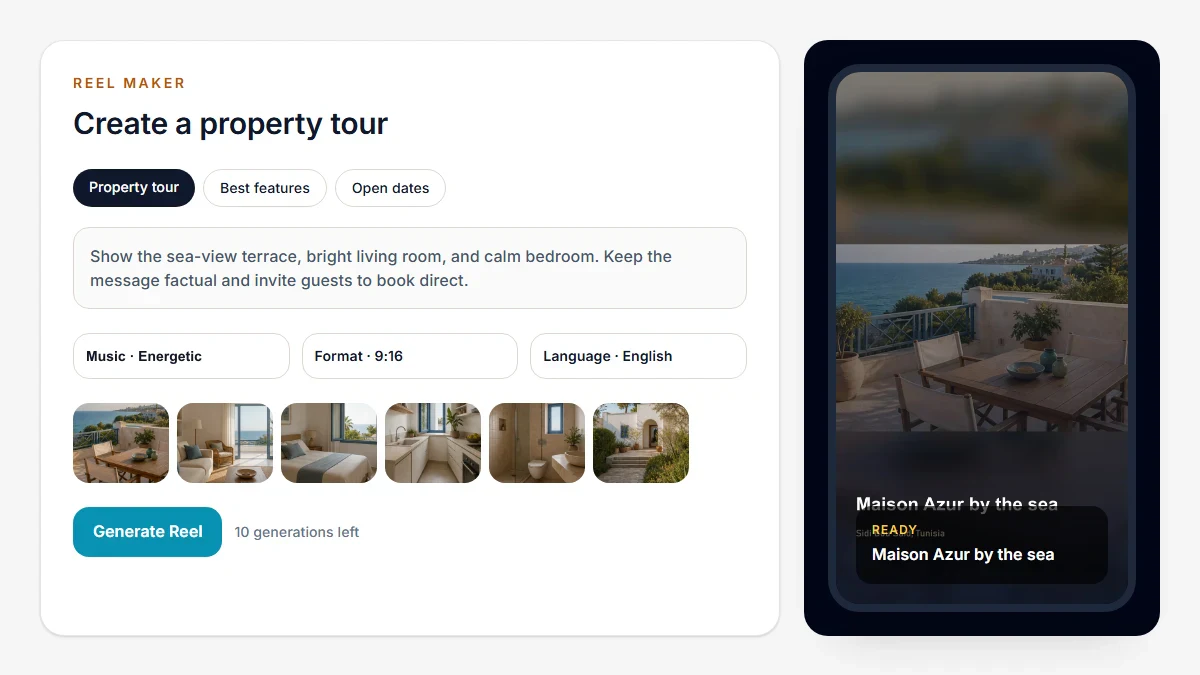
Host-Pilot turns 5–8 property photos and verified property data into a 9:16 Reel with licensed music, a caption, hashtags, and your exact direct-booking URL. Review the storyboard, download the publishing package, and post it yourself.
1080 × 1920 · 15 sec
This 15-second example was rendered by the same FFmpeg workflow used for property Reels. It uses six fictional property photos and the Energetic track One More Dance.
Video transcript: Maison Azur by the sea; Sidi Bou Said, Tunisia; 2 bedrooms, 1 bathroom, sleeps 4; book direct at maison-azur.host-pilot.ai.
Host-Pilot prepares the asset and reminder. It does not automatically publish to Instagram, Facebook, TikTok, or another social network.
The workflow stays deliberately short: choose the message, verify what will be said, and generate only when the draft is right.
Start with a property tour, best feature, open dates, exact offer, approved guest review, local spotlight, or seasonal angle.
Host-Pilot selects 5–8 owned photos, arranges six scenes, and shows the source behind every property, calendar, review, or guide claim.
Create the 9:16 Reel, copy the caption, download the full package, and upload it manually to the channels you choose.
The output is designed for hosts who need a dependable social asset, not a timeline editor. Branding, language, duration, music, and the booking CTA remain constrained so there are fewer decisions to make.
Every Reel should make one clear point. The source column shows what Host-Pilot is allowed to use before it builds the storyboard.
| Goal | Best use | Verified source |
|---|---|---|
| Property tour | Introduce the space in a calm six-scene sequence. | Property facts and owned photos |
| Best features | Focus on real amenities that distinguish the stay. | Published property data |
| Fill open dates | Promote a specific unblocked date range. | A calendar sync completed within 30 minutes |
| Special offer | Repeat the host’s exact terms and expiry date. | Host-entered offer text |
| Guest review | Highlight one approved quotation without rewriting its meaning. | Imported review or rights-confirmed host quote |
| Local spotlight | Connect the stay to a real nearby place or host note. | Visible guest-guide content |
| Seasonal | Use real dates and location without inventing weather or events. | Property location and calendar dates |
Host-Pilot freezes the photos, facts, language, branding, and booking URL when a generation is accepted. The creative planner may arrange those facts and improve wording, but it cannot create a new amenity, rating, price, date, view, event, or offer.
Availability is checked before rendering and again before a scheduled reminder. If a new reservation conflicts, the reminder is suppressed and the campaign returns to Needs review.
Plan my month creates four evenly spaced suggestions in a mobile-friendly agenda. Approve them once; if an approved item changes, only that item needs approval again.
At the scheduled time, Host-Pilot sends an in-app and email reminder with the Reel, caption, package, Mark published, and Skip actions. One follow-up is sent after 24 hours if the item remains unhandled.
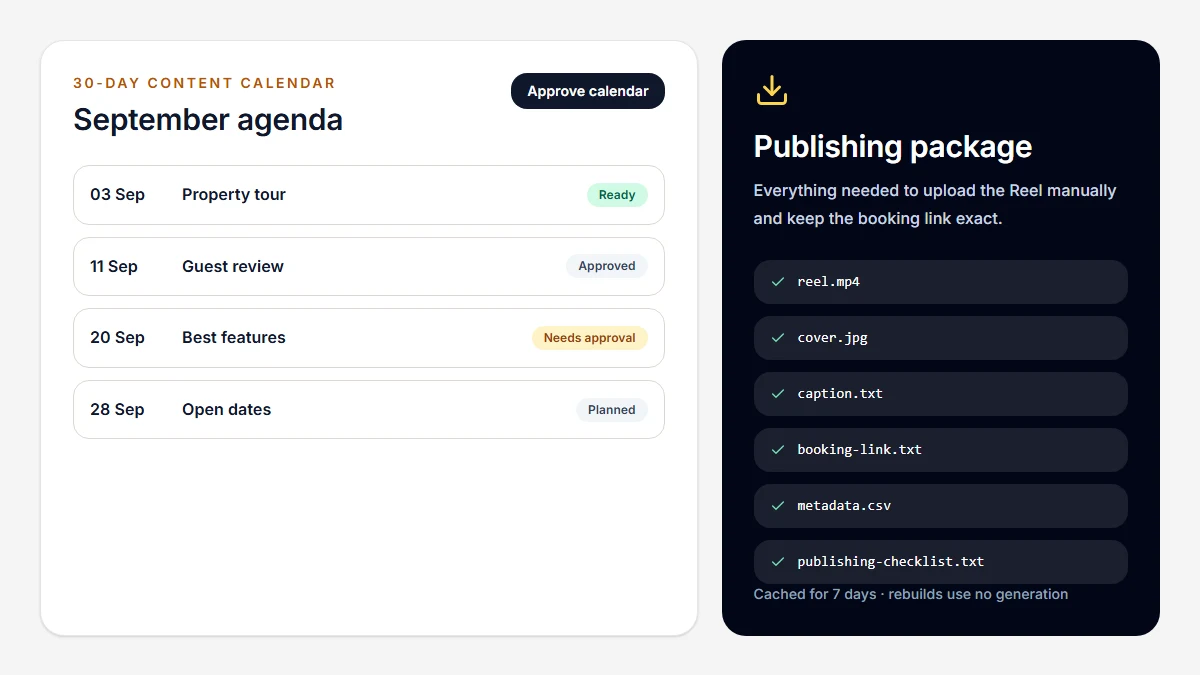
A ready Reel can be downloaded as a seven-day cached ZIP. Rebuilding the package does not consume another video generation. Property and all-property history can also be exported as CSV.
FICTIONAL OPERATING EXAMPLE
A host with one seaside apartment wants a steady presence without becoming a video editor. Host-Pilot proposes four distinct drafts, and the host removes one before approving the calendar.
Reel Maker is intentionally constrained. That reduces friction, but it is not the right production method for every campaign.
| Need | Best fit | Why |
|---|---|---|
| Repeatable photo-based property Reels | Host-Pilot | Verified sources, booking CTA, captions, planning, and exports stay together. |
| Original footage, drone shots, interviews, or voiceover | Videographer | A real shoot can capture movement, sound, people, and atmosphere that listing photos cannot. |
| Frame-level editing, custom motion, or several aspect ratios | Advanced video editor | Use a timeline tool when detailed creative control matters more than a low-friction workflow. |
It turns property photos and rental information into a short promotional video. Host-Pilot adds a verified storyboard, vertical formatting, licensed music, caption, hashtags, and the exact direct-booking link.
Yes, after the photos have been imported into a property you own in Host-Pilot. Host-Pilot is independent of and not endorsed by Airbnb.
No. You review and download the Reel, then upload it manually to Instagram, Facebook, TikTok, or another channel.
No. Claims must come from frozen property, calendar, review, offer, website, or visible guest-guide data. Unsupported claims are rejected.
A 1080×1920, 9:16 H.264 MP4. Host-Pilot uses 15 seconds for offers, availability, and reviews, and 24 seconds for tours, features, and local spotlights.
Each generation needs 5–8 reachable photos owned by the selected property. Host-Pilot does not fill a Reel by excessively repeating fewer photos.
Yes. Host-Pilot offers nine approved, royalty-free tracks across Relaxed, Elegant and Energetic moods.
Pro currently includes 10 manual or revision generations per UTC calendar month. Storyboard planning and package rebuilding use no generation; terminal internal failures refund the reserved allowance.
You can download the MP4 or a package with the cover, caption, hashtags, booking link, metadata, and publishing checklist. Reel history is also available as CSV.
Start with the property photos and facts you already maintain in Host-Pilot. Review the storyboard before using a generation.
Start your free trial