Guest communication

Airbnb Check-in Message: Templates Guests Can Use at the Door

Built for hosts with 1–10 properties

Guests do not need a long text wall before arrival. They need one clear message with the exact check-in steps, directions, and property info they can open fast.

Start with the listing you already have

Turn your listing into a complete guest check-in flow

Paste your Airbnb or Booking.com listing URL. Host Pilot imports the property details and opens the guided setup for a complete guest check-in flow.

Next: create your account and start the 30-day free trial. A payment method is required before generation.

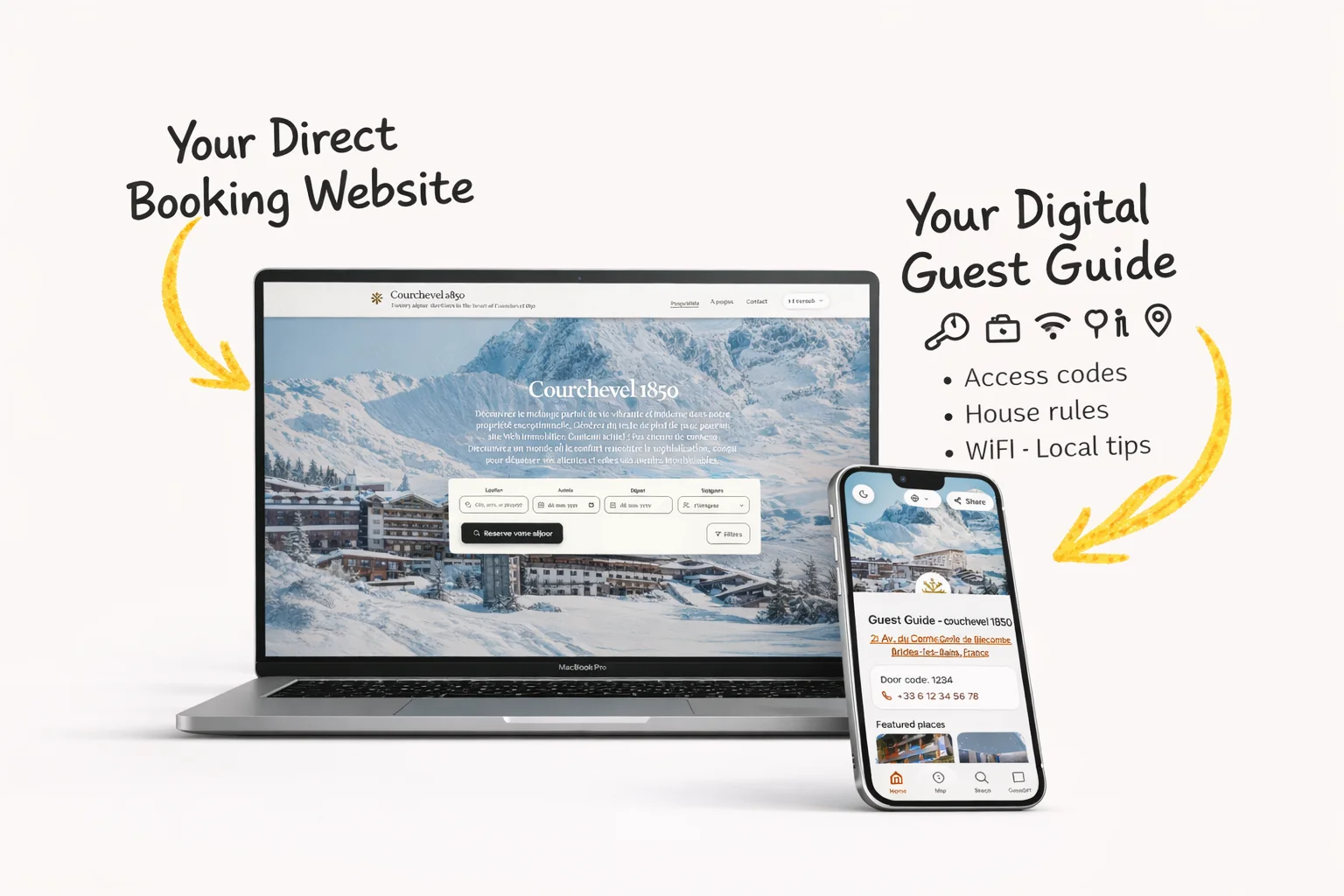
Listing URL → direct booking website → guest guide → guest communication

Short answer: what a good Airbnb check-in message does

A strong Airbnb check-in message gives the guest the next useful step about Airbnb check-in without forcing them to ask twice. Keep it short, personal, and specific: give arrival time, access method, address cues, and the guide link in one calm note. If the message starts to become a mini manual, link to the guest guide instead.

When to send it

  • Send it after the reservation is safe and again close enough to arrival that the guest will use it.
  • Send it before the guest has to make a decision about Airbnb check-in.
  • Let automation handle the repeatable part, then answer personally when the guest has an edge case.
Guest journey moment for Airbnb check-in in a short-term rental stay
The guest moment: Airbnb check-in should feel clear before the guest has to ask.
Host workflow illustration for managing Airbnb check-in with guest messages and a guide link
The host workflow: one message, one guide link, and fewer repeated questions.

Simple solution

Replace scattered instructions with one short check-in message that links to the full guide and keeps every arrival consistent.

Start free trial

2 min - see exactly how it works

Practical host story (example)

Example, not a testimonial: A guest lands late and opens the thread outside the building with low battery. The win is not a longer message. The win is one calm message about Airbnb check-in, with the important detail up front: give arrival time, access method, address cues, and the guide link in one calm note.

Copy/paste Airbnb check-in message templates

Use these Airbnb check-in message examples as starting points. Replace the placeholders, keep the tone human, and link to your guest guide when the answer needs more detail.

Warm version

Best when the guest has already messaged you and you want to sound personal.

Hi {{guest_name}}, thanks for reaching out about Airbnb check-in. give arrival time, access method, address cues, and the guide link in one calm note. Tell the guest to save the guide link before traveling. Full details are here: {{guide_link}}

Why this works

It acknowledges the guest first, answers directly, and moves the detailed instructions into the guide.

Short version

Best for mobile guests who only need the answer.

Hi {{guest_name}}, quick note on Airbnb check-in: give arrival time, access method, address cues, and the guide link in one calm note. Details: {{guide_link}}

Why this works

It keeps the answer scannable and reduces the chance the guest misses the link.

Automated version

Best for scheduled messages or saved replies.

Hi {{guest_name}}, here is the important info for Airbnb check-in. give arrival time, access method, address cues, and the guide link in one calm note. If anything looks different for your stay, reply here and I will help.

Why this works

It feels automated but still gives guests permission to ask when their situation is different.

Guide-link version

Best when the answer includes WiFi, parking, check-in, house rules, or local recommendations.

Hi {{guest_name}}, I put the full Airbnb check-in details in the guest guide so you can open them anytime: {{guide_link}}. Tell the guest to save the guide link before traveling.

Why this works

It keeps the message light and trains the guest to use the guide before sending another question.

Build the Airbnb check-in message around the arrival action

A useful Airbnb check-in message gets a guest from the street to the correct entrance without making them search a long thread. Lead with the arrival window, a recognisable address cue, the access method, and the next action. Put photographs, parking detail, appliance notes, and house rules in a private mobile guide that the guest can reopen after entering.

The message also needs a fallback. A smart lock can be offline, a building door can look different at night, or a guest can arrive with limited data. State how to contact the host and what information to send. Do not promise instant access before the agreed check-in time, and do not expose reusable access credentials on a public page.

A reliable Airbnb check-in message workflow

Separate preparation, the travel reminder, door access, and exception handling so each message has one job.

  1. 01

    Confirm the arrival plan

    After booking, confirm the check-in window, ask for an estimated arrival time only when operations require it, and tell the guest when detailed access instructions will arrive. This reduces early uncertainty without sharing sensitive information too soon.

  2. 02

    Send the travel-ready version

    Close to arrival, put the property name, address cue, transport or parking note, and private guide link in a short message. Ask the guest to open the link before travelling in case mobile reception is weak near the property.

  3. 03

    Make the door step impossible to miss

    Use numbered steps for the exact entrance, lockbox, keypad, key pickup, or meet-and-greet process. Explain one physical landmark and one action. If a code is time-limited, say when it becomes active.

  4. 04

    Provide a calm fallback

    Tell the guest what to check once, then how to contact you. A useful fallback names the entrance, asks for a photo or error message when appropriate, and avoids sending the guest through several unrelated support channels.

  5. 05

    Test after every operational change

    Walk the route after a lock, building sign, parking rule, or key location changes. Update the Airbnb check-in message and private guide together, then use a test reservation to verify the scheduled send.

Airbnb check-in message templates for common arrivals

Replace every placeholder and remove any line that does not apply to the booked property.

Self check-in with keypad

Use when a unique code becomes active at the agreed arrival time.

Hi {{guest_name}}, check-in at {{property_name}} starts at {{check_in_time}}. The entrance is {{landmark}}. Use code {{door_code}} on the keypad, then press {{confirm_key}}. Your private arrival guide with photos is {{guide_link}}. If the keypad shows an error, send me a photo here.

It states timing before the code, gives a visual cue, and keeps a single reply path.

Lockbox arrival

Use when the box location and opening motion often cause confusion.

Welcome, {{guest_name}}. The lockbox is {{exact_location}} beside {{landmark}}. Enter {{lockbox_code}}, press {{release_action}}, and return the key after opening. Photos: {{guide_link}}. If you cannot identify the box, message me before trying another entrance.

The physical action is as important as the code, especially at night.

Late arrival

Use when the guest will arrive after normal support or reception hours.

Hi {{guest_name}}, your late arrival is noted for approximately {{arrival_time}}. Please save {{guide_link}} before travelling. Use {{entry_method}} at {{entrance_cue}}. Quiet hours begin at {{quiet_time}}. If travel changes, reply in this thread so I can keep the access plan accurate.

It acknowledges the exception without overwhelming the guest with unrelated rules.

Example: a delayed flight and a low phone battery

This is a realistic example, not a testimonial. A guest expected to arrive at 19:00 but reaches the building after midnight. The host has not buried the entrance under a long welcome paragraph. The first screen shows the building cue, active keypad code, and one guide link. The guide contains daylight and night photographs. When the keypad flashes red, the guest follows one troubleshooting step and sends the exact error in the Airbnb thread. The host can solve the exception quickly because the normal route was already clear.

Troubleshoot the message before blaming the guest

Repeated arrival questions usually point to a missing decision, stale source, or badly timed instruction.

Guests ask for the address on arrival day.

Put the verified address and one recognisable landmark in the travel-ready message, then check that the platform map pin and guide agree.

Guests enter the correct code but cannot open the door.

Add the physical action after code entry and a photo of the correct keypad or lockbox. Test the wording with someone who has never used it.

Guests say they never received instructions.

Check the scheduled-message trigger, last-minute booking rule, notification channel, and guide URL with a test booking instead of simply resending the same automation.

Guests arrive before access is active.

Place the check-in time beside the access instruction and explain any luggage option separately. Do not imply that receiving a code means early access is available.

What to automate and when to take over

Automate verified repetition

Confirmation timing, arrival reminders, guide links, and property-specific access steps can be scheduled when their source data is dependable.

Handle access failure personally

A guest outside the property needs a direct response. Treat lock failure, unsafe surroundings, incorrect directions, and missing keys as human escalation events.

Use a fuller system when operations demand it

Multiple buildings, staffed receptions, rotating codes, or many units may need a PMS, smart-lock integration, or on-call process beyond a simple message workflow.

The message-quality protocol for a real stay

Treat every guest message as one part of a journey, not as an isolated piece of copy. The reservation record is the source for dates and guest names, the message carries the time-sensitive action, and the private guest guide stores details that may be needed again. When those three sources disagree, automation makes the error travel faster. Review the source information first, then the wording, trigger, and destination link.

Write for a guest holding a phone while travelling. Put the decision or action in the first two lines, keep one instruction per sentence, and use labels for codes, times, networks, or addresses. A friendly opening matters, but it must not bury the useful information. Read the draft aloud and test it at the property entrance or at the exact moment the guest will need it.

Personalisation should confirm that the message belongs to this stay. Use the guest name, property name, arrival or departure date, and only variables that are reliably populated. Never let an empty variable create a confusing sentence. Keep a plain fallback version for last-minute reservations, altered access arrangements, or a platform delay.

Automation is appropriate for predictable moments and verified facts. A host should take over when a guest reports a safety issue, cannot enter, disputes a charge, requests an exception, or describes something that may require judgement. The goal is not to avoid conversation. It is to remove repetitive searching so the host has attention available when a human answer matters.

Pre-publish and pre-send checklist

  • OKThe first screen answers the guest question without scrolling.
  • OKDates, times, names, links, codes, and property references are current.
  • OKThe message still makes sense if an optional variable is unavailable.
  • OKThe private guide opens on mobile and matches the message.
  • OKA guest knows where to reply when the normal process fails.
  • OKA real test reservation has received the message at the intended time.

Measure clarity, not message volume

Use a simple four-week review. Count repeat questions about the topic, messages that needed correction, late manual interventions, and guests who could not complete the intended action. Read the actual conversations behind those numbers. One repeated question can reveal a missing landmark, an unclear time zone, a stale password, or a guide link that is difficult to find.

Change one element at a time and record the date. A shorter opening, clearer label, earlier trigger, or better fallback may solve the problem without adding another automated message. Keep the version that reduces confusion while preserving a natural reply path. This produces a communication system that becomes more useful with each real stay.

Why hosts use this

Hosts usually look for Airbnb check-in message when they want a simpler way to handle guest communication, arrivals, bookings, or day-to-day operations without adding extra admin.

Fewer arrival mistakes

Put the door code, parking, directions, and timing in one place so guests arrive prepared.

Shorter message, better clarity

A clean message plus one link is easier to read than several paragraphs and screenshots.

Reusable for every booking

Save your best check-in flow once and keep it consistent across all future reservations.

Common mistakes to avoid

  • Writing one long paragraph that hides the action
  • Sending the message too late for the guest to use it
  • Repeating guide details in every thread instead of linking the guide
  • Sounding so automated that guests hesitate to reply

What belongs in the guest guide instead

The message should create clarity. The guide should hold the detail guests may need later, especially on mobile after arrival.

  • Full access steps with photos
  • WiFi and parking details
  • House rules guests may need later
  • Local recommendations and emergency contacts

How Host Pilot keeps this simple

Host Pilot is useful here because the message, guest guide, and direct booking website can come from the same listing setup. Paste your Airbnb or Booking.com listing URL, then use the generated guest guide link inside automated guest communication. Less guest questions. More direct bookings.

  • Generate a direct booking website from one listing.
  • Generate a mobile guest guide guests can open by link or QR code.
  • Connect guest communication to the same stay information instead of rewriting it in every thread.

Example check-in message

Optional example

Keep the message short and let the guide handle the detail:

Hi {{guest_name}}, you can find check-in instructions, parking, and WiFi here: {{guide_link}}

Quick FAQ

Quick answers for hosts comparing options and trying to fix guest communication, arrival, and operations pain points.

What is this?

This is a host-friendly Airbnb check-in message format that helps guests get arrival details quickly without asking follow-up questions.

How does it work?

You send one short check-in message before arrival and link guests to the full instructions, WiFi, and property guide.

Can I use it with Airbnb/Booking?

Yes. The same check-in message structure works for Airbnb and Booking.com stays when you want a consistent guest arrival process.

What should I include in a Airbnb check-in message?

Include the decision the guest needs, the timing, and the next step. For Airbnb check-in, the key detail is: give arrival time, access method, address cues, and the guide link in one calm note.

Should I automate a Airbnb check-in message?

Yes for repeatable timing and standard answers. Keep room for a personal reply when the guest has a special request or something operational has changed.

What should an Airbnb check-in message include?

Include the check-in window, verified location cue, access method, one immediate action, private guide link, and a clear contact route for an exception.

When should I send an Airbnb check-in message?

Set expectations after booking, then send the practical arrival version close enough to check-in that the guest can find and use it while travelling.

Should an Airbnb check-in message contain the door code?

Share access details only through an appropriate private channel and according to your security process. Say when a time-limited code becomes active and avoid public exposure.

How do I test an automated Airbnb check-in message?

Create a test reservation, verify variables and timing, open every link on a phone, and physically follow the instructions from the street to the correct door.

Related pages

Browse nearby host workflows from the hub so you can compare practical next steps without starting over.

Start free trial

Use Host Pilot to connect guest communication, guest guides, direct bookings, and operations in one workflow built for smaller host teams.

GSC performance refresh

Airbnb check-in message: a practical host guide

An Airbnb check-in message should let a guest complete the first practical action on arrival: find the property, enter it safely, and know what to do if something is different. The best Airbnb check-in message is short enough to scan outside the building and links to a guest guide for details that the guest may need again.

How to write an Airbnb check-in message guests can actually use

An Airbnb check-in message is not a complete house manual. Its job is to get a tired traveller from the street to the right door with the right next step. Lead with the arrival window, address cue, access method, and a contact path for an exception. Put long directions, photos, Wi-Fi, parking, and house rules in the linked guest guide.

Good timing matters as much as good writing. Send the Airbnb check-in message after the booking is secure and again close enough to travel that the guest can find the thread quickly. Review it on a phone with low attention, not only at a desk.

A four-step Airbnb check-in message workflow

1. Put the arrival action first

Start the Airbnb check-in message with the exact action the guest needs at the door, followed by the most useful location cue.

2. Add a calm exception route

Tell the guest what to do if the lock, building entrance, or arrival time differs from the plan. A short clear escalation path reduces panic.

3. Link to durable information

Keep photographs, Wi-Fi, parking, rules, and local tips in a mobile guide that the guest can reopen later.

4. Test it on location

Read the Airbnb check-in message while standing at the property entrance. Remove anything that delays the next action.

What belongs in the message

The address cue, arrival window, access step, and exception contact belong in an Airbnb check-in message because the guest needs them now.

What belongs in the guide

Wi-Fi, parking detail, appliance instructions, house rules, and recommendations are more useful in a guide than inside every message thread.

How to keep it human

Use the guest name, acknowledge travel when appropriate, and invite a reply when something does not match the stay. Avoid pretending the message covers every scenario.

Airbnb check-in message shown to a guest before arrival
A check-in note is most useful when the arrival action is visible before the guest starts scrolling.
Host reviewing an Airbnb check-in message workflow
Use a guest guide for repeatable details and reserve the message for time-sensitive arrival steps.

Common Airbnb check-in message mistakes

  • Putting the door code after several paragraphs of welcome text.
  • Sending conflicting access details in multiple messages.
  • Using an Airbnb check-in message as the only place for durable information.
  • Failing to update the message when an entrance or lock changes.

Airbnb check-in message FAQ

What should an Airbnb check-in message include?

Include the arrival window, a clear location cue, the access step, the guest guide link, and a simple contact instruction if the arrival plan changes.

When should I send an Airbnb check-in message?

Send a useful confirmation after booking, then a practical arrival reminder close enough to check-in that guests can find it while travelling.

Should I put the door code in an Airbnb check-in message?

Only use the level of access detail appropriate to your security process. Keep the important arrival action easy to find and update it immediately when access changes.