Import once

Turn your Airbnb or Booking.com listing into a direct booking website and guest guide.

Operations & setup

Manage Airbnb Reservations With a Clear Host Workflow

Built for hosts with 1–10 properties

Reservation work expands quickly when booking details, guest messages, and task follow-up live in different places. Even small host teams feel the drag when every booking needs extra checking.

Direct answer

How to manage Airbnb reservations without losing the next action

To manage Airbnb reservations well, keep the booking details, guest communication, arrival plan, tasks, and exceptions in one working flow. Start every reservation by confirming what is fixed, what still needs a decision, and who owns the next step. That protects the stay from being managed through scattered inboxes and memory.

For a host with one to ten properties, reservation management is less about adding complex software and more about building a repeatable handoff. The same booking should guide guest messages, cleaning, access, the guest guide, and checkout follow-up. When each person works from the same current context, fewer questions become emergencies.

Host planning Airbnb reservation details with a calendar, phone, keys, and turnover notes
A reservation is easier to manage when dates, guest context, and operational notes are reviewed together.
Host checking an Airbnb arrival handoff in a vacation rental entryway
A short arrival handoff prevents the booking record, the cleaner, and the guest from working from different assumptions.

Why reservation management becomes messy

Most reservation problems begin as a small missing connection. A guest changes their arrival time, but the cleaner only sees the original checkout. A co-host promises an early check-in before checking the calendar. An owner blocks a night and nobody checks whether the message sequence needs to change. Each decision may be reasonable by itself; the friction appears when the decision is not attached to the reservation everyone is managing.

The answer is not to send more messages. It is to decide what information is operational, record it once, and make it easy to find at the right moment. Arrival time, access method, cleaning status, special requests, outstanding questions, and the next owner are operational. Restaurant recommendations and house rules are useful too, but they usually belong in a guest guide rather than in the reservation task list.

The reliable pattern is deliberately unglamorous: decide who owns the next action, record the decision beside the stay, and verify completion before the deadline matters. A host does not need a giant operations team to use this pattern. One person can own every action at first. The value is that the next person who opens the booking can see what has happened, what remains, and which detail should not be guessed.

Treat the booking record as a working brief, not a receipt. It should answer the questions that create expensive interruptions: who is arriving, when can they enter, what must be ready, which information has already been sent, and who should make the final call when something changes. A calendar date alone cannot carry that operational context. A clear brief can.

A practical Airbnb reservation workflow

1. Confirm the reservation facts

Check the guest name, number of guests, dates, property, payment or platform status, and the booking source. Do this before you promise an early arrival, extra linen, or a change to the stay. It creates one reliable starting point for the rest of the workflow.

2. Make the next operational action explicit

Assign the next step rather than writing a vague note. For example: send arrival information on Tuesday, confirm cleaning by 14:00, or ask the guest to confirm a late arrival. A named action with a due time gives the booking momentum.

3. Separate guest-facing information from internal notes

Send a short reservation message with only what the guest needs now. Keep access contingencies, cleaner coordination, owner instructions, and unresolved questions inside the host workflow. This reduces accidental disclosure and stops long messages becoming the source of truth.

4. Verify the change after a handoff

When someone marks an action complete, verify the outcome that matters. Check the right guest received the guide link, the cleaner confirmed the turnover, or the calendar reflects an owner block. The verification is where a workflow becomes dependable.

5. Close the stay deliberately

After checkout, record any follow-up, maintenance issue, or review reminder while the context is still fresh. Then remove resolved notes so the next stay does not inherit yesterday’s noise. A clean close makes the following arrival easier to manage.

When a simple reservation workflow is enough

A shared reservation workflow is often enough when a small team manages a modest number of properties, has a clear calendar source of truth, and can verify handoffs. It is especially useful when the real problem is scattered communication rather than an inability to process bookings.

A heavier property-management setup may be more appropriate when many staff members, owners, accounting rules, or distribution channels need strict permissions and central reporting. The useful choice is not the tool with the longest feature list. It is the workflow that keeps a reservation understandable at 18:00 on a busy changeover day.

Build a short verification moment into every handoff. A message marked sent is not proof that the guest received the right access instructions. A task assigned is not proof that the apartment is ready. A listing copied into a new tool is not proof that its details are accurate. The useful question is always: what can we check now, before the guest is affected?

Reservation control checklist

  • Correct dates, property, guest count, and booking source confirmed.
  • Arrival method and expected arrival window known or awaiting a named follow-up.
  • Cleaning and property readiness have one visible owner.
  • Guest receives only the next useful information, with durable detail in the guide.
  • Special requests and exceptions are linked to the booking, not hidden in a chat.
  • One final readiness check happens before the guest can be affected.

Build confidence through small, visible controls

Good reservation management does not depend on a perfect week. It should still work when the host is travelling, a cleaner is delayed, or a guest asks an unexpected question. Make the few controls that matter visible: current availability, the next owner, readiness status, and the one unresolved exception. Then agree on what happens when any of those controls is missing. A simple escalation rule such as “do not promise access until readiness is confirmed” protects both the guest and the team.

Review the workflow after a difficult stay, but avoid turning every exception into a permanent new step. Ask what information was missing, where it should have appeared, and who needed it. Add the smallest helpful change. Over time, the reservation flow becomes easier to trust because it reflects real operating decisions rather than an ideal process nobody follows.

Realistic host scenario

Example: a late check-in that stays calm

This is a realistic host scenario, not a customer case study. On Thursday afternoon, a guest changes their arrival from 18:00 to after midnight. The host adds the new window to the reservation, checks that self check-in instructions are already valid, and asks the guest for a simple confirmation after they enter. The cleaner does not need a long conversation; they see that the turnover still has the same deadline and that the access method has not changed.

The host then sends one concise message with the guide link and the one action the guest must take if they cannot enter. The guide contains Wi-Fi, parking, appliance instructions, and local recommendations. The reservation flow contains the exception and the owner. The guest gets a simple experience, while the team keeps the operational detail where it belongs.

Mistakes that create avoidable guest friction

Treating messages as the booking record

A chat thread is good for conversation, but it makes poor operational memory. Save the decision beside the reservation.

Promising exceptions before checking readiness

Early check-in and late checkout affect cleaning, availability, and access. Check the facts before confirming.

Sending every detail in one message

Guests need the next action first. Put durable stay information in a guide they can reopen later.

Closing nothing after checkout

Unresolved notes multiply. Record genuine follow-up, then clear what no longer matters.

Keep exceptions visible without making the whole process complicated. Late arrivals, an extra bed, a maintenance issue, an owner block, or a guest asking for an earlier arrival can each be a short note with an owner and a due time. This is more dependable than holding important information in a chat thread, a personal memory, or a message to yourself that no one else can see.

Connect the reservation to the guest journey

Host Pilot starts from the listing you already have, then helps connect a direct booking website, a mobile guest guide, and guest communication around the same property information. The practical benefit is less re-entry and fewer repeat questions, not a promise that operations run themselves.

Automate your Airbnb reservations and increase occupancy

See how Host Pilot transforms your daily operations and occupancy.

Before
Airbnb reservations before automation with low occupancy and manual follow-up
After
Airbnb reservations after automation with higher occupancy and faster booking management
  • Higher occupancy
  • More direct bookings
  • Less guest messaging

Simple solution

Use one reservation workflow that keeps booking context, guest information, and next steps tied together from inquiry to checkout.

Start free trial

2 min - see exactly how it works

Why hosts use this

Hosts usually look for manage reservations airbnb when they want a simpler way to handle guest communication, arrivals, bookings, or day-to-day operations without adding extra admin.

See the full reservation picture faster

Keep guest context, timing, and stay information together so you spend less time hunting for details.

Connect communication with operations

Reservation management gets easier when messages, arrival info, and tasks are linked to the same booking flow.

Handle more stays with less admin

A cleaner reservation process helps hosts stay organized as booking volume grows.

Typical reservation workflow

Optional example

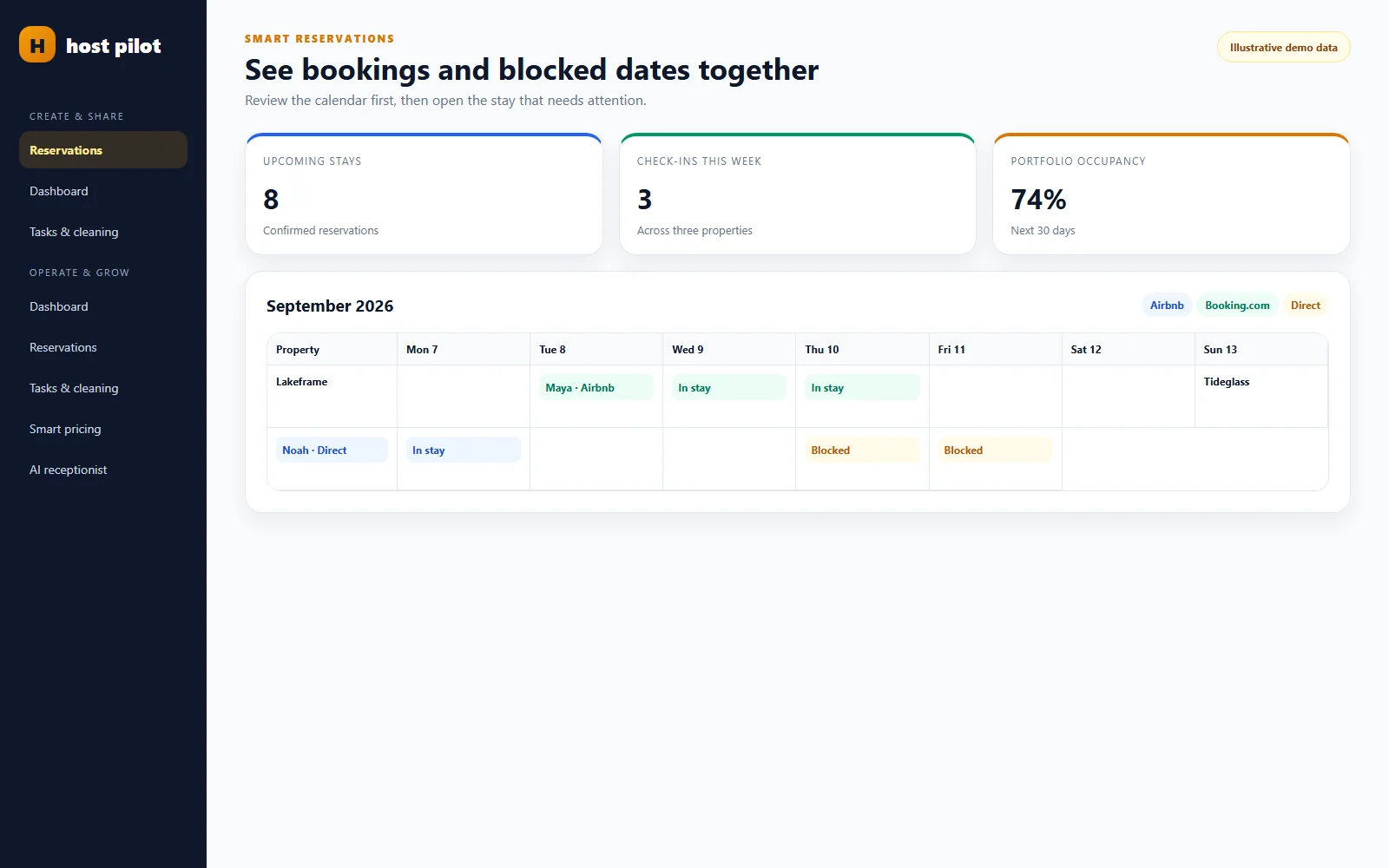
A host reviews one booking view with arrival timing, guest messages, check-in instructions, and the operational next steps needed before the guest arrives.

Quick FAQ

Quick answers for hosts comparing options and trying to fix guest communication, arrival, and operations pain points.

What is this?

This is a reservation management workflow for Airbnb hosts who want less admin and better visibility across the guest journey.

How does it work?

It keeps reservation information, communication, and operational follow-up connected so the booking is easier to manage from start to finish.

Can I use it with Airbnb/Booking?

Yes. The workflow supports Airbnb-first operations and still fits hosts who also manage Booking.com reservations.

What is the best way to manage Airbnb reservations?

Use one current reservation brief that connects the booking facts, the next action, guest communication, property readiness, and exceptions. The best workflow is the one a host or co-host can understand quickly during a busy handoff.

Should I manage Airbnb reservations in a calendar or an inbox?

Use the calendar for availability and the inbox for conversation, but keep operational decisions tied to the reservation. Neither a date grid nor a chat thread alone explains what must happen next.

How do I avoid missing an Airbnb reservation task?

Give each task an owner and a due time, then add a small verification step before the guest depends on it. A task marked complete is useful only when the expected result is clear.

What information belongs in an Airbnb guest guide?

Put durable guest information such as arrival directions, Wi-Fi, house rules, appliance help, and local recommendations in the guide. Keep internal coordination and exceptions in the reservation workflow.

Can Host Pilot help with Airbnb reservation management?

Host Pilot can help a small host team connect property information, guest guides, communication, and direct-booking workflows. Review your platform and operating needs before relying on any tool for a critical booking process.

Related pages

Browse nearby host workflows from the hub so you can compare practical next steps without starting over.

Start free trial

Use Host Pilot to connect guest communication, guest guides, direct bookings, and operations in one workflow built for smaller host teams.