01
Plan
Read checkout, next arrival, property and priority notes.
Import once
Turn your Airbnb or Booking.com listing into a direct booking website and guest guide.
Turnover operations
Organize Airbnb cleaning around the next arrival, not around a vague cleaning day. Confirm checkout and check-in times, assign one responsible cleaner, define room-by-room standards, surface damage or missing stock immediately, and require a final readiness check. A shared calendar shows when the work is due; a checklist and photo handoff show whether the property is actually ready.

Every turnover needs a deadline, an owner, a readiness standard and a way to escalate exceptions.
01
Read checkout, next arrival, property and priority notes.
02
Calendar, payment status, access plan and turnover responsibility are clear.
03
The guest has the right message for this stage, without sensitive access details too early.
04
Questions, incidents and changes have an owner and a written record.
05
Checkout, cleaning, damage notes and follow-up are complete.
The cleaner should not have to reconstruct the reservation, search old messages or guess what “clean” means.
Confirm checkout, next check-in and the safe cleaning window before assigning the task.
Check that the dates are blocked everywhere they should be. iCal can reduce manual work, but refresh delays mean a last-minute booking still deserves a direct verification.
Confirm turnover, access method, maintenance issues and any missing guest information. Ask only for information needed for the stay or required locally.
Separate confirmation, pre-arrival, check-in and checkout messages. Put stable details such as Wi-Fi, appliance instructions and local tips in the guest guide.
Record incidents, confirm cleaning, review repeated questions and improve the listing, guide or message that caused the friction.
Checkout is at 10:00 and the next guest arrives at 15:00. The cleaner sees the property, guest-free window and priority notes before travel. At 13:45, a damaged lamp is reported with a photo. The host decides whether to replace it, disclose it or take the room out of service; the cleaner continues the safe tasks and performs a final room check.
Check availability, price and channel rules before promising the change.
Pause operational assumptions and verify the source-channel record.
Assess whether the stay can be delivered safely; document facts and contact the platform when required.
Stop new commitments, preserve evidence and resolve the authoritative reservation first.
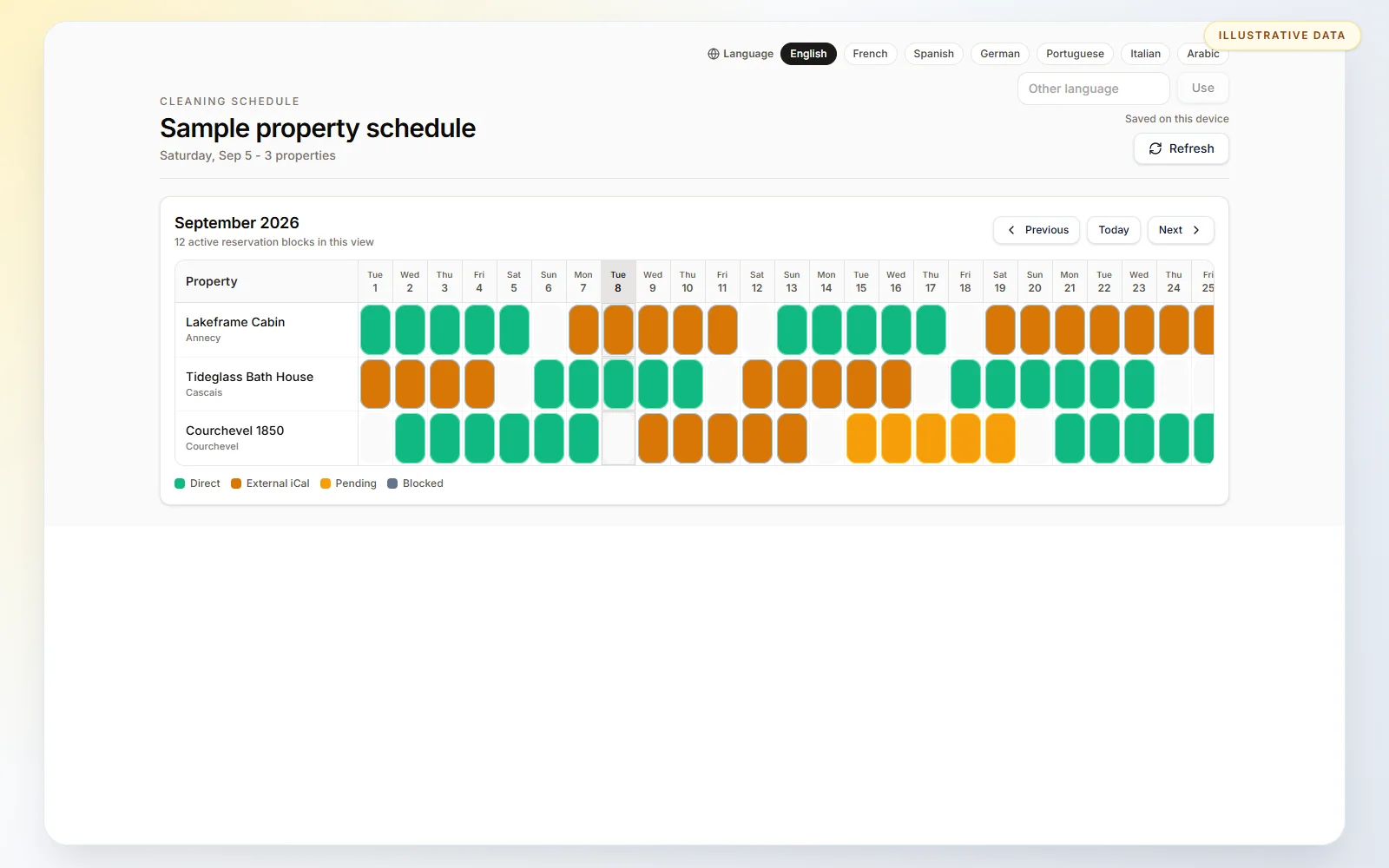
HostPilot can show upcoming stays and tasks together, while the cleaner calendar can be shared by link or protected with a PIN. Stable guest-facing details belong in the digital guest guide; a temporary issue belongs in the affected guest’s communication.
HostPilot does not certify hygiene, employ or insure cleaners, inspect the property, purchase supplies or decide whether a safety issue is acceptable. The host remains responsible for standards and the final go/no-go decision.
Organize Airbnb cleaning around the next arrival, not around a vague cleaning day. Confirm checkout and check-in times, assign one responsible cleaner, define room-by-room standards, surface damage or missing stock immediately, and require a final readiness check. A shared calendar shows when the work is due; a checklist and photo handoff show whether the property is actually ready.
Assign it as soon as checkout, next arrival and the safe work window are known; reconfirm after material reservation changes.
Request only evidence that helps verify readiness or document an exception: key rooms, access, damage, missing stock and the final condition.
Photograph it, state the time and room, avoid unsafe work, notify the host and wait for a clear decision when the issue affects readiness.
No. Operational standards stay in the cleaner workflow. Only guest-facing, stable information belongs in the guest guide.
Yes. HostPilot provides a focused cleaner calendar that can be shared by link or protected with a PIN, without exposing the full host workspace.
The host or designated operator owns the final standard and safety decision. A completed checklist is evidence, not a guarantee.
HostPilot can show upcoming stays and tasks together, while the cleaner calendar can be shared by link or protected with a PIN. Stable guest-facing details belong in the digital guest guide; a temporary issue belongs in the affected guest’s communication.